
Why did the app lose authorization?
Salesforce recently enforced new security rules for connected apps.
Because of this, your org may require re-authorization.
This is expected and easy to fix.
How do I fix it?
Just follow these steps:
- Open Currency Updater Pro from the App Launcher
(If you don’t see it, assign permission setCurrency_Updater_Setup) - Go to Currency Updater Setup
- Click Authorize
- Accept the permissions
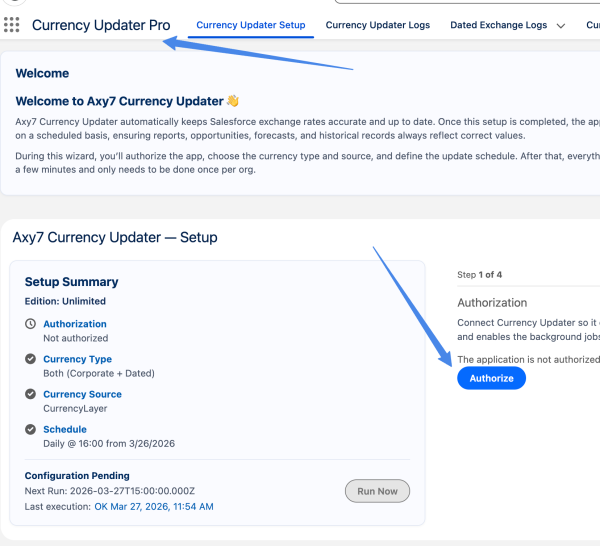
That’s it ✅
This is required because the app needs an authorized user to update exchange rates
How do I know if this is my issue?
You may see:
- “Not authorized” in Setup
- Updates not running
- Missing data in logs
Will I be notified automatically?
Yes
We have a monitoring job that checks this daily.
If authorization is lost, you will receive a Salesforce notification with a direct link to fix it.
How can I check if data is missing?
- Go to Currency Updater Logs
- Review recent executions
Every update is logged so you can verify success or errors easily
What if data is missing?
No problem
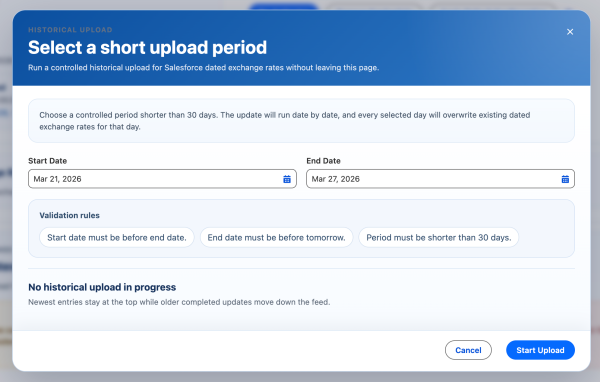
We enabled Advanced Historical Loader for your org:
- Go to Setup tab
- Open Historical Upload
- Select the missing dates
- Run the upload
Do I need to do this often?
No
Normally this is a one-time action per org
Still not working?
We’re here to help 🙂
- Share your Org Id
- Or grant us login access
We’ll check everything for you quickly